In short: Dashtoon Studio shut down on 15 August 2026 and now sends creators to Frameo, an AI video platform that does not make comics. For AI webtoons, pick Anifusion if you liked composing panels yourself, or Comistitch to turn a written story into consistent vertical episodes. The Dashtoon reading app still works.
Last checked: October 2026. Every claim about another product links to that vendor’s own page, checked on 14 October 2026; see Sources. This post was previously a Dashtoon vs Comistitch comparison; we rewrote it after the Studio closed.
What are the best Dashtoon alternatives at a glance?
| Tool | Vertical-scroll output | Character consistency | Free tier | Cheapest paid plan | Export | Commercial use |
|---|---|---|---|---|---|---|
| Comistitch | Yes — webtoon episodes built from your story | Portrait reference per character | 100 credits at signup, no card (~2–3 pages) | $12.99/mo Starter ($6.50/mo billed yearly) — pricing | Free exports watermarked | Elite, or Starter/Pro billed yearly; free output is personal use — pricing |
| Anifusion | Yes — “vertical scroll webtoons” listed | Six-view character sheets, LoRA | 100 one-time credits | 9 USD/mo (Creator) | “High resolution exports” on paid plans | Included on paid plans, subject to terms |
| LlamaGen | Webtoon and manhwa listed as formats | Listed on Pro and up | 1 character, 4 panels per page | 18 USD/mo (Standard) | “Export HD work for publishing” on Pro | Yes once subscribed; firms over 500,000 USD revenue need Pro+ |
| ComicInk | Not mentioned on site | ”Character Lock” | None — 100 starter credits, creating needs a paid plan | 9.99 USD/mo (Basic) | Print PDF, page ZIP, 720p MP4 | Commercial rights kept; storefront pays creators 70% |
| Midjourney | No — single images only | Reference images, no comic system | None | 10 USD/mo (Basic) | Single images | Paid plans; firms over 1 million USD revenue need Pro or Mega |
| AI Comic Factory | No — one page at a time | None between generations | Free | None | Single page | Not stated |
| Frameo (Dashtoon’s successor) | No — video and short drama | Not stated | Not stated | Prices not listed | Video | ”Full commercial rights” listed as a plan feature |
Prices are monthly and in USD, as shown on each vendor’s page on 14 October 2026. “Not stated” means the vendor’s own site does not say, so we did not fill the gap.
What happened to Dashtoon Studio?
Dashtoon Studio closed on 15 August 2026. Its creation page at dashtoon.com/create is now titled “Dashtoon Studio has closed” and reads, in full:
“Dashtoon Studio shut down on 15 August 2026 and is no longer available. Creation continues on Frameo — our new platform for AI video and short drama.”
The page counts down ten seconds and then redirects to Frameo, with a “Stay here” link if you want to read it. The old Studio plans URL, dashtoon.com/studio/plans, now serves a page titled “Frameo Pro - Canvas”. The notice gives no reason for the closure, and we found no independent news coverage of it, so we are not going to guess at one.
Dashtoon Studio was the part of Dashtoon where creators built AI comics and webtoons: character profiles, per-panel generation and assembly into episodes. That is the part that is gone.
Is Dashtoon still working for readers?
Yes: the Dashtoon reader was still running on 14 October 2026. The homepage still carries the line “Read and create your own comics, manga and manhwa online”, the comics catalogue loads, and individual reading pages open normally.
The Dashtoon app was also still listed on Google Play, where it shows an update dated 13 February 2026, and on the Apple App Store.
The homepage navigation still has a “Create” link and Studio links. They lead to the closure notice and to Frameo, not to a working comic tool. If you landed here asking “is Dashtoon still working?”, the answer is: reading, yes; creating, no.
What happens to my Dashtoon account and comics?
The shutdown notice does not say. It names no export deadline and does not explain what happens to accounts, saved projects or character profiles. The only instruction is a contact line: “Questions about your account or your work?” with the address contact@dashtoon.com.
So, honestly: we do not know whether old Studio projects can still be downloaded, and you should not take anyone’s word for it, including ours. If you have episodes or character art you never saved locally, email that address and ask what can still be recovered.
What you can do now without waiting:
- Collect what you have. Any exported pages, character images or scripts on your own devices are the starting point for rebuilding in a new tool.
- Write down your cast. A short description of each character — face, hair, outfit, colours — is enough to recreate them as a reference in most alternatives.
- Check your published series. If you published on the Dashtoon reader, open your series page and see whether it still loads; the reading pages we tried did.
Is Frameo a replacement for Dashtoon Studio?
Not for comics. Dashtoon recommends Frameo, but Frameo’s homepage describes “an AI video production platform” for “films, micro-dramas, ads, and social content”, where “generation, editing, and final assembly happen on one canvas”. It does not mention comics, webtoons or comic pages.
Frameo’s footer lists it as a product of Dashverse, alongside DashReels, so it comes from the same company. Its pricing page lists “Full commercial rights” as a plan feature but shows no plan prices, and says nothing about a free plan.
If you were turning your webtoon into short video drama anyway, Frameo is worth a look. If you want to keep publishing comics, you need a comic tool.
Which alternative keeps characters consistent?
Comistitch, Anifusion and LlamaGen all have a defined character system; they differ in how you set it up and which plan you need. Character consistency was the main reason many creators used Dashtoon, so this is the first thing to test.
- Comistitch — you create each character once from a portrait reference, and that reference keeps them consistent across panels and pages. You do not attach it panel by panel; the builder handles it for every page in the project.
- Anifusion — its character design tool turns a description into “a six-view reference sheet you can review, refine, and reuse”, and its library supports character sheets and LoRA models (Anifusion).
- LlamaGen — Standard gives you 10 custom characters, but “Character Consistency” is listed only on Pro (30 USD a month) and higher (LlamaGen pricing).
- ComicInk — “Character Lock” defines a character once and keeps face and costume fixed across pages, per the vendor (ComicInk).
- Midjourney and AI Comic Factory — no comic character system. Midjourney accepts reference images; AI Comic Factory forgets your characters between generations.
For techniques that work in any tool, see the character consistency guide.
Which alternatives make vertical-scroll webtoons?
Comistitch and Anifusion both state vertical-scroll webtoon output, and LlamaGen lists webtoon and manhwa as formats; ComicInk, Midjourney and AI Comic Factory do not.
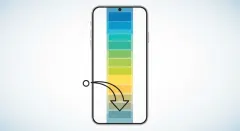
Vertical scroll is its own way of composing: wide establishing shots stacked over reaction beats, with gutter length doing the pacing a page turn does in print. A tool that only exports square or print pages leaves you to slice and re-stack them yourself.
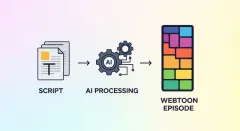
- Comistitch builds the vertical episode from your written story when you choose a webtoon style; the AI webtoon creator page shows the settings. For Korean-style full colour, the AI manhwa generator is the closer match.
- Anifusion lists “Turn stories into vertical scroll webtoons” on its homepage and gives you a canvas to arrange panels yourself — the closest to how Dashtoon Studio felt if you assembled every scroll segment by hand.
- LlamaGen lists webtoon and manhwa among its output types (LlamaGen).
If the labels are blurry, manhwa vs manga vs webtoon explains the formats, and how to create a webtoon with AI walks through a full episode.
What do the free tiers really give you?
Comistitch and Anifusion both start you with 100 credits, LlamaGen has a limited free plan, and ComicInk and Midjourney have no free plan. None of them is unlimited.
- Comistitch: 100 credits at signup, no card. A page costs 30 credits, so that is about two to three pages. Free exports carry a watermark. Paid plans start at $12.99/mo (Starter, 750 credits; $6.50/mo billed yearly) — see the pricing page.
- Anifusion: 100 one-time credits and one workspace on the free plan; commercial use is listed on paid plans, not on Free (Anifusion pricing).
- LlamaGen: a free plan with one custom character, one storyboard project and up to four panels per page (LlamaGen pricing).
- ComicInk: 100 starter credits and two free renders, but creating requires a paid plan: Basic at 9.99 USD a month (1,500 credits) or Plus at 19.99 USD (4,500 credits) (ComicInk pricing).
- AI Comic Factory: free in the browser, one page at a time.
- Midjourney: no free tier (Midjourney plans).
The cheapest way to choose is to rebuild the same short scene from your Dashtoon series in two tools and compare the results.
Which alternatives allow commercial use?
Most paid plans allow it, but every vendor attaches conditions, so read the terms before you sell anything.
- Anifusion: “Commercial use included” on Creator and Pro, “subject to our terms and the rights you hold in your inputs”; not listed on Free.
- LlamaGen: “If you have subscribed at any point, you are free to use your images in just about any way you want,” but companies with more than 500,000 USD in gross yearly revenue must buy Pro or Unlimited.
- ComicInk: the homepage says creators keep commercial rights, and its storefront (paid, preview or free access per issue) pays creators 70% of each sale (ComicInk).
- Midjourney: paid plans allow commercial use; companies earning over 1 million USD a year must use Pro or Mega.
- Comistitch: commercial use is included on Elite, and on Starter and Pro when billed yearly; free and monthly Starter/Pro output is for personal use, and free exports are watermarked (pricing).
How do you move a Dashtoon series to a new tool?
Start from your script and your cast, not from your old panels. In a story-to-comic tool you paste prose; you do not prompt each panel. Here is the kind of input you would give Comistitch to restart a romance webtoon at episode 12, after creating both characters from portrait references:
Episode 12. Rain on the café windows after closing. Hana, short black bob,
oversized green cardigan, is stacking chairs when Jun, tall, grey raincoat,
knocks on the glass holding a soaked sketchbook. She lets him in. "You said you'd
never come back here," she says, arms folded. He opens the sketchbook to a page
of her drawn at the counter, months ago. "I came back for this," he says. Close
on Hana's hands as she turns the page and finds the next one blank. Final panel:
the two of them at one table, the sketchbook between them, rain easing outside.
The details that keep the series recognisable — hair, clothing, colours — live in the character references, so the episode text can stay about the story. On a canvas tool like Anifusion you would instead compose each of those beats as its own panel and arrange the scroll yourself.
To speed up the next episode, the free webtoon script generator turns a premise into a paneled scene you can edit. When the episode is ready, best platforms to publish webcomics compares where to post it now that Dashtoon Studio is gone.
Which should you choose?
- Choose Anifusion if you liked Dashtoon Studio’s hands-on approach and want to compose every panel and scroll segment yourself, on a 9 USD Creator plan or its 100 free credits.
- Choose Comistitch if you write the story first and want the builder to lay out consistent vertical episodes for you, and you want to test it on 100 free credits without a card. It is not a photo-to-comic tool.
- Choose LlamaGen if you want many formats and styles quickly from a prompt or script, and you are fine on Pro if you need character consistency.
- Choose ComicInk if you want the same story as a comic and a short video and are happy to pay from the start (9.99 USD a month on Basic).
- Choose Frameo if you are turning your series into AI video or short drama rather than comics.
- Choose Midjourney if you only need covers or key art and will lay out pages elsewhere.
If what you actually want is a comic starring real people from photos, none of these is built for it; myComics.ai is. For the wider field, see the best AI comic generator 2026 roundup, and for a closer look at canvas tools, Anifusion, NightCafe and Mage compared.
Rebuilding a webtoon series? See how vertical episodes come out of the AI webtoon creator.
Sources (last checked October 2026)
All checked on 14 October 2026 on each vendor’s own site.
- Dashtoon Studio closure notice — shut down 15 August 2026, redirects to Frameo, contact address for account questions
- Dashtoon homepage and comics catalogue — reader still live
- Dashtoon on Google Play and App Store — app still listed
- Frameo and Frameo pricing — AI video platform, Dashverse product, “Full commercial rights”, no prices listed
- Anifusion and Anifusion pricing — vertical-scroll webtoons, six-view sheets, Free 100 credits, Creator 9 USD, commercial use on paid plans
- LlamaGen and LlamaGen pricing — webtoon/manhwa formats, free plan limits, Standard 18 USD, consistency on Pro+, 500,000 USD threshold
- ComicInk and ComicInk pricing — Character Lock, exports, Basic 9.99 USD, Plus 19.99 USD, no free plan
- Midjourney plans — Basic 10 USD, no free tier, 1 million USD commercial threshold
- AI Comic Factory Space — free single-page generator
- myComics.ai — personalized comics from photos
- Comistitch pricing — free credits, page cost, watermark, paid plans