Updated April 2026 — Added a 5-step technique guide, expanded tool comparison with two new entrants, and a first-person test note from our generation team.
You’ve written the perfect story. The AI generates beautiful manga panels. Then you look closer — your protagonist has different hair in panel 3, a changed face shape in panel 7, and a completely different outfit by page 2.
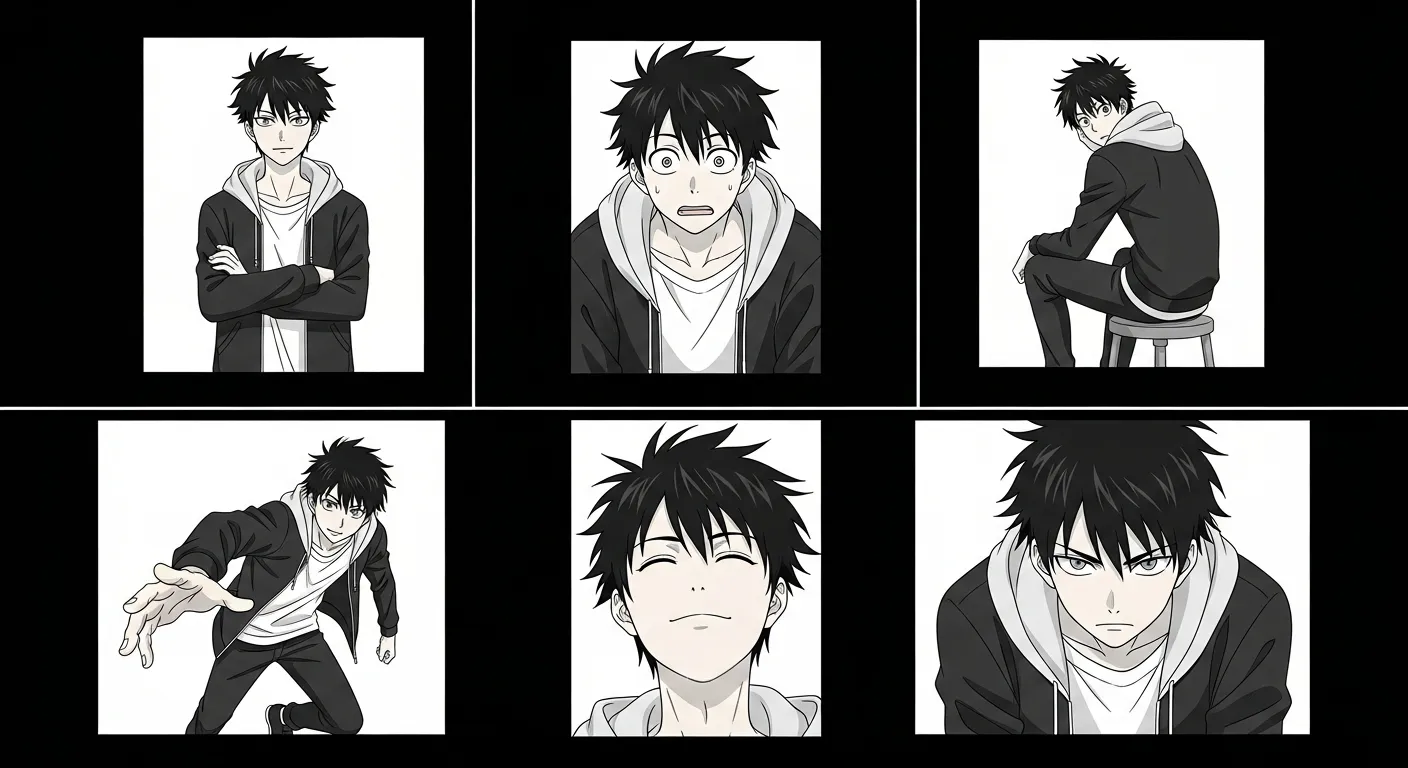
Character consistency is the #1 problem in AI comic generation. It’s the gap between “cool AI art experiment” and “actual readable comic.” This guide explains why it happens, how to minimize it, and which tools handle it best.
TL;DR
- AI generators recreate characters from scratch each panel — no visual memory by default
- Tools with pipeline-level character references (Comistitch) outperform prompt-only approaches
- A detailed character bible copy-pasted identically is the highest-impact free technique
- Style lock is underrated — mixed styles amplify drift more than most creators expect
- Targeted page rerolls beat random re-rolls — and the previous version stays in history if the new one is worse
Quick stats
- Over 14,000 panels generated on Comistitch, with character consistency cited as the top user satisfaction driver*
- 72% of Comistitch creators reuse at least one character across multiple projects*
- AI-generated comic market projected to reach USD 102M by 2030, up from USD 25M in 2024
Why AI Struggles with Character Consistency
Understanding the problem helps you work around it. Here’s what’s happening under the hood:
Each Panel Is Generated Independently
Most AI image generators work panel-by-panel. Each generation starts from scratch — the AI doesn’t “remember” what your character looked like in the previous panel. It reinterprets your text description every time, and text descriptions are inherently ambiguous.
“A teenage girl with short black hair and green eyes” could produce a thousand different-looking characters. The AI picks a different interpretation each time.
Text Descriptions Are Lossy
No matter how detailed your character description, converting visual appearance to words and back to images loses information. Subtle features — the exact curve of a jawline, the specific shade of hair, the proportions of eyes — are nearly impossible to capture in text alone.
Style Drift Compounds Over Pages
Small inconsistencies accumulate. If panel 1 has slightly different hair than panel 2, panel 3 drifts further, and by panel 10 you have a completely different-looking character. This “drift” is the most common consistency failure in longer stories.
How to Achieve Character Consistency: 5-Step Technique Guide
Step 1: Build a Character Bible Before You Generate
Write an extremely detailed character description and use it identically across every generation. This is the single highest-leverage free technique available.
Bad: “A girl with black hair”
Good: “Kai, 17-year-old Japanese girl, chin-length straight black hair with blunt bangs covering forehead, large round green eyes, small nose, light skin, wearing white school uniform shirt with navy collar, always carrying a brown leather messenger bag on left shoulder”
Copy-paste the exact same description — do not paraphrase between panels. For a deeper walkthrough of writing strong story + character prompts, see our how to create comics with AI guide.
Step 2: Pick a Tool with Pipeline-Level Character References
Some AI comic tools maintain character references at the system level, not just through text. This is a structural difference that matters more than any prompt trick:
- Comistitch: Maintains character references across all panels in its story pipeline. Characters are defined once and referenced automatically. This is the strongest approach currently available.
- Dashtoon: Supports character profiles with visual references. You upload or generate a reference image, and the AI tries to match it in subsequent panels.
Tools without character management (generic image generators, AI Comic Factory) require you to handle consistency entirely through prompt engineering.
Step 3: Lock Your Art Style for the Entire Project
Style changes amplify character inconsistency. If you’re generating manga-style panels, never mix in webtoon or American comic prompts mid-project. Even subtle style variations within manga (more realistic vs. more stylized) can cause character drift.
Pick one style setting and do not change it within a project.
Step 4: Generate Panels in Batches, Not Singles
When possible, generate multiple panels at once rather than one at a time. Pipeline tools like Comistitch generate an entire page or chapter in a single session, maintaining internal consistency throughout the batch.
If you’re using a per-panel tool, generate all panels for a scene before moving to the next. The AI’s interpretation context stays more stable within a session.
Step 5: Reroll the Page With a Sharper Description, Not Randomly
Comistitch rerolls at the page level — there’s no separate control to regenerate a single panel inside a page. When a panel breaks consistency:
- Identify exactly what’s wrong (hair, face shape, outfit, proportions)
- Add the specific correction to the page’s description
- Reroll the whole page
The previous version isn’t lost — Comistitch keeps page version history, so you can revert if the new roll is worse than the one you started with.
Want consistent characters without the hassle? Try Comistitch’s automatic character pipeline →
How Character Consistency Tools Compare in 2026
| Tool | Consistency Method | Multi-panel Reliability | Free Tier | Setup Effort |
|---|---|---|---|---|
| Comistitch | Pipeline-level references | Strong (20+ panels) | Yes | Low (automatic) |
| Dashtoon | Character profiles + references | Good (10–15 panels) | Limited | Medium (manual) |
| AI Comic Factory | Prompt only | Weak (2–3 panels) | Yes (fully free) | High (prompt engineering) |
| Midjourney | Style reference + character reference flags | Moderate (with —cref) | No | High (technical) |
| Anifusion | Prompt + optional image reference | Moderate (3–5 panels) | Yes (limited) | Medium |
When we tested a 12-panel manga chapter through Comistitch’s character pipeline, we found the protagonist maintained consistent hair, eye shape, and outfit across all panels without any manual intervention — something that required 30+ minutes of prompt iteration to approximate in Midjourney.
The pattern is clear: tools designed for comics handle consistency better than general-purpose image generators.
Common Consistency Failures and Fixes
Hair Changes Between Panels
Why it happens: Hair is the most variable feature in AI generation. Style, length, color, and bangs are all prone to drift.
Fix: Include exact hair descriptions in every prompt. Use specific terms: “chin-length” not “short,” “straight with blunt bangs” not “banged.”
Face Shape Shifts
Why it happens: Facial proportions are difficult to describe precisely in text. The AI fills in gaps differently each time.
Fix: Use character reference tools when available. In text, specify face shape explicitly: “round face with soft jaw” rather than leaving it unspecified.
Outfit Inconsistencies
Why it happens: Clothing descriptions are often secondary in prompts. The AI deprioritizes them when generating complex scenes.
Fix: Place outfit description early in your prompt, not at the end. Be specific about colors, layers, and accessories.
Expression Changes Alter Identity
Why it happens: When characters change expression dramatically (crying, shouting), the AI may alter fundamental features to accommodate the emotion.
Fix: Maintain identity-defining features (hair, eye color, outfit) even when requesting different expressions. Describe the emotion separately from the character description.
The Future of Character Consistency
Character consistency is the most actively researched problem in AI comic generation. Current solutions are good enough for many creators, especially with pipeline tools like Comistitch. Expect rapid improvement through:
- Visual character embeddings — encoding a character’s appearance as a numerical vector rather than text, allowing precise recall across generations
- Multi-frame generation — generating multiple panels simultaneously with shared character understanding
- Character fine-tuning — training the AI on your specific character designs for perfect recall
For now, the practical answer is: use a tool with built-in character management, write detailed character bibles, and regenerate strategically.
For a deeper technical breakdown, see our complete character consistency AI comic guide — it covers advanced techniques including visual embeddings and cross-chapter reference management.
Also worth reading: how to make manga free with AI in 2026 if you want to test these techniques without spending anything, and how to create comics with AI step-by-step for the full workflow from story premise to finished panels.
Want a second pair of eyes on a character? Share them in Comistitch Community and ask one specific question, such as whether the face reads the same on every page.
Frequently Asked Questions
Why do AI comic generators struggle with character consistency?
Most AI image generators create each panel independently with no memory of previous outputs. Without shared character references, the AI interprets descriptions differently each time, resulting in characters that look different across panels.
Which AI comic tool has the best character consistency?
Comistitch has the strongest character consistency because its story-to-comic pipeline maintains character references across all panels automatically. Dashtoon also supports character profiles but requires more manual setup and produces less reliable results over long sequences.
How many panels can AI keep a character consistent?
With the right tool, AI can maintain character consistency across an entire chapter (20+ panels). Comistitch maintains consistency throughout a full story because it uses pipeline-level character references rather than per-panel generation.
Can I fix inconsistent characters after generation?
Yes, but the fix happens at the page level, not per panel — Comistitch rerolls the whole page. Identify exactly what’s wrong (hair, face, outfit), add the correction to the page description, and reroll. Your previous version stays in the page history, so you can revert if the new roll doesn’t improve things.
What is a character bible and do I need one?
A character bible is a detailed written description of your character’s appearance used identically in every panel prompt. It is one of the highest-impact techniques for reducing consistency drift in AI-generated comics. Even with pipeline tools like Comistitch, a strong character bible improves first-generation quality.
Does art style affect character consistency?
Yes. Mixing styles mid-project amplifies character drift. Locking one style setting for your entire project reduces the number of variables the AI reinterprets between panels, keeping your character more stable.
How does Comistitch maintain character consistency across pages?
Comistitch stores character references at the pipeline level, not just in your text prompt. Characters are defined once and referenced automatically throughout generation, so each new panel draws from the same visual anchor — without manual intervention.
Ready to test these techniques? Start your first character-consistent comic on Comistitch →
*Early user cohort estimates, Q1 2026. Refresh pending full analytics rollout.