Updated April 2026 — Expanded with HowTo workflow, stats, and links to the new text-to-webtoon and comic stitching guides.
You have a story. Maybe it’s a novel chapter you’ve been working on for months. Maybe it’s a screenplay that never got produced. Maybe it’s just an idea that has been living in your head for years.
Now you can turn that story into a comic — in minutes, not months. AI comic generators in 2026 can take written text and convert it into fully illustrated, panel-by-panel comics. No drawing skills. No hiring an artist. No months of production.
TL;DR
- Paste any story text into an AI comic tool — no drawing skills required
- Comistitch generates ~45 seconds per panel* with automatic layout and speech bubbles
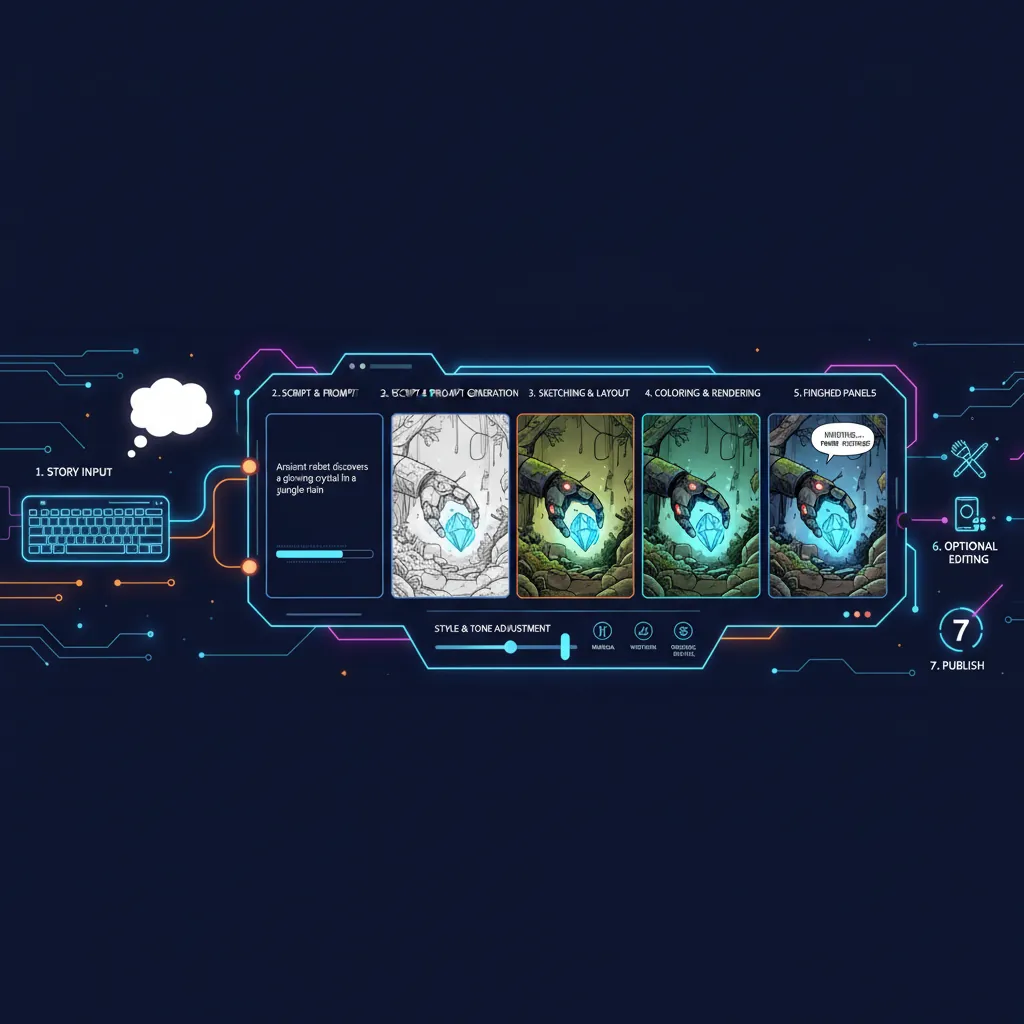
- The 6-step process: prep story → choose style → generate → review → refine → export
- Manga and webtoon formats both work; vertical webtoon scroll needs specific style selection
- Best results come from scene-focused, visually descriptive text with short dialogue
Quick stats
- Over 14,000 panels generated on Comistitch to date*
- Average comic project runs 12 panels — a full episode in one generation session*
- 72% of creators reuse at least one character across multiple projects*
- Manga market projected at USD 23.12B globally in 2026 (Statista)
What You Need Before You Start
Just a story. The story can be:
- A rough idea — “Two astronauts discover an alien civilization inside a comet”
- A scene description — a few paragraphs describing what happens
- A script — formatted dialogue and stage directions
- A novel chapter — existing prose from a longer work
- A screenplay excerpt — formatted script with dialogue
AI comic tools can work with all of these. The more visual detail you provide, the better the output — but even a single sentence can generate a comic.
Step-by-Step: Turn Your Story Into a Comic
Step 1: Choose Your Tool
For story-to-comic conversion, you want a tool with a story pipeline — not just an image generator. Comistitch is built specifically for this workflow — the AI comic book maker takes a written story or script through to finished pages. Other options exist but require more manual work per panel.
When we ran a 12-panel space thriller scene through Comistitch’s story pipeline, we got a fully assembled comic — panels, speech bubbles, layout — in under 4 minutes. The same scene would take 30+ minutes directing each panel individually in a manual tool.
Step 2: Prepare Your Story
Write or paste your story. For best results:
- Keep scenes focused — one location, one sequence of events per generation
- Include character descriptions — even brief ones help consistency
- Write visually — describe what the reader would see, not just internal thoughts
- Include dialogue — this becomes speech bubble text
Example input:
“Mira stepped into the abandoned space station. The lights flickered overhead, casting shadows across walls covered in strange alien symbols. Her scanner beeped — detecting life signs ahead.
‘That’s impossible,’ she whispered into her radio. ‘This station was abandoned 200 years ago.’
A sound echoed from the corridor ahead. Footsteps. Something was coming.”
Step 3: Set Your Style
Choose manga, webtoon, or American comic style. This affects the entire visual tone:
- Manga: Black-and-white, expressive faces, dynamic panel layouts
- Webtoon: Full color, vertical scroll format, clean digital art
- American comic: Bold colors, detailed backgrounds, traditional panel grid
Pick the style that matches your story’s tone. If you’re planning a webtoon series, see our guide on the complete text-to-webtoon AI workflow for vertical format specifics.
Step 4: Generate
Submit your story and let the AI work. With Comistitch, this takes 2-5 minutes for a typical scene. You’ll get back a complete comic with panels, dialogue, and layout — assembled automatically.
Step 5: Review and Refine
Check every panel carefully:
- Do characters look consistent from panel to panel?
- Does the action flow logically across the page?
- Is the dialogue placed correctly in speech bubbles?
- Are there any composition or artifact issues?
Reroll pages that don’t meet your standards. Most scenes need 1-2 page rerolls. That’s normal — it’s not a failure of the tool, it’s part of the workflow.
Step 6: Export and Share
Download your comic as PDF, images, or web-ready format. For multi-page webtoon projects, our AI panel assembly guide covers stitching individual pages into a full episode.
Ready to convert your story? Turn your story into a comic free with Comistitch →
Writing Stories That Work Well as Comics
Not all prose converts equally. Here’s how to write (or rewrite) stories that produce strong comic output:
Focus on Action and Visuals
Comics are a visual medium. Scenes with clear physical action, character movement, and visible emotion translate best.
Works well: “She slammed her fist on the table, sending papers flying. The room went silent.”
Works poorly: “She thought about the implications of the decision for a long time, weighing the pros and cons carefully.”
Use Short, Punchy Dialogue
Comic dialogue lives in small speech bubbles. Long monologues don’t translate. Break dialogue into short exchanges:
Works well:
- “We need to leave. Now.”
- “But the data—”
- “Forget the data. They’re coming.”
Works poorly: “I’ve been thinking about this situation for a while now, and I believe that given the circumstances, we should probably consider leaving this location relatively soon.”
Include Scene-Setting Details
Give the AI visual anchors for backgrounds and environments:
Helpful: “The rooftop garden at sunset, city skyline visible behind rows of tomato plants”
Too vague: “They were outside somewhere”
Write in Scenes, Not Summaries
Each generation works best as a discrete scene — a sequence of events in one location with continuous action.
Good scope: A single confrontation between two characters in a coffee shop
Too broad: “Chapter 3: The hero travels across three countries, meets five new characters, and discovers the villain’s plan”
Comparison: Story-to-Comic Approaches
| Approach | Tool Type | Time Per Page | Character Consistency | Best For |
|---|---|---|---|---|
| Full story pipeline | Comistitch | 2-5 min | Automatic | Writers, serialized content |
| Panel-by-panel manual | Dashtoon | 15-30 min | Manual profiles | Detail-focused art directors |
| Prompt-only image gen | Midjourney + manual assembly | 30-60 min | None (manual) | Illustrators with tech skills |
| Script → panel breakdown | Generic AI tools | 20-40 min | Minimal | Intermediate users |
The story pipeline approach is the fastest path from draft to published page. For a full breakdown of tool differences, see our Comistitch vs Dashtoon comparison.
Converting Different Source Materials
Novel Chapters → Comic Episodes
Break chapters into scenes. Each scene becomes one comic generation. A typical novel chapter might produce 3-5 comic pages. Focus on the most visual, dramatic moments — you don’t need to adapt every paragraph.
Screenplays → Comics
Screenplays are the easiest to convert because they’re already structured visually. Scene headings become panel settings, action lines become panel descriptions, and dialogue transfers directly to speech bubbles.
Short Stories → One-shot Comics
Short stories (1,000-3,000 words) are ideal for single-session comic generation. The entire story can often be converted in one sitting, producing a complete 8-15 page comic.
Story Ideas → Proof of Concept
Even rough ideas work. Write 2-3 paragraphs describing your concept, generate a short comic, and see whether the visual execution matches your vision. This is the fastest way to test whether a story idea works as a comic format.
What to Do After You’ve Generated Your First Comic
Your first generation is a proof of concept. Here’s what to do next:
- Build your character — use Comistitch’s character creator to lock in a consistent character design across future scenes
- Plan your episode structure — decide how many panels per page, how many pages per episode
- Generate scene by scene — work through your story in scenes, not chapters
- Assemble into a series — learn panel layout and stitching in our comic panel assembly guide
For the full text-to-webtoon workflow including vertical format publishing, see the text-to-webtoon complete guide.
Related read: If your stack is OpenAI-only, see the full pipeline comparison.
Frequently Asked Questions
Can AI turn any story into a comic?
Yes. AI comic generators can convert any text — story ideas, novel chapters, screenplays, or simple descriptions — into illustrated comic panels. Shorter, scene-focused text works best for quality output.
How long can the story be?
Most AI comic tools work best with scenes or chapters rather than entire novels. Comistitch handles 500-2000 word passages effectively. For longer works, break them into chapters and generate one at a time.
Can I turn a novel into a manga series?
Yes. Break your novel into chapters, then convert each chapter into a comic episode. Many creators use this approach to serialize their written works as ongoing manga or webtoon series.
Do I need to rewrite my story for comic format?
Not necessarily. AI comic tools like Comistitch can interpret prose and convert it to panel scripts automatically. However, rewriting with more visual, action-oriented descriptions produces noticeably better results — especially for dialogue-heavy scenes.
How fast can AI turn a story into a comic?
With Comistitch, the average panel generation time is approximately 45 seconds.* A full 12-panel scene typically completes in 2-5 minutes, including layout and speech bubbles.
What art styles can AI generate from my story?
Comistitch supports 21 art styles including manga, manhwa, webtoon, and American comic. Manga and manhwa account for about 55% of style selections on the platform.*
Can AI maintain the same character across the whole story?
Yes. Comistitch’s pipeline carries character references through every panel automatically. About 72% of creators reuse at least one character across multiple projects.*
Don’t have a story yet? The free comic story idea generator turns a one-line premise into a plot outline ready for the conversion workflow above.
*Early user cohort estimates, Q1 2026. Refresh pending full analytics rollout.