Updated September 2026 — Comistitch plan prices re-verified against the live pricing page; Pixton for Schools pricing is quote-based and not published, so no figure is quoted here.
The verdict, stated plainly: if you teach grades 3–6, run a 30-student class, or your district requires published COPPA and FERPA documentation from every vendor, choose Pixton. It is a mature, classroom-managed platform and it wins those rows outright. If you teach narrative writing in grades 7–12 and want the quality of a student’s prose to visibly determine the quality of their panels, choose Comistitch.
The underlying question is short: do you want students to arrange a story or write one?
Comistitch vs Pixton: The Comparison Table
| Pixton for Schools | Comistitch | |
|---|---|---|
| How art is made | Avatar library — students assemble pre-built parts | Generative AI from a written script |
| Character consistency | Guaranteed — the avatar is one static asset | Maintained by the pipeline from a character sheet |
| Original character design | Limited to the library’s vocabulary | Students’ own characters, rendered |
| Class roster + teacher dashboard | Yes — built in | No — individual accounts only |
| Published COPPA / FERPA documentation | Yes | No — verify data processing directly before deploying |
| Best grade band | Roughly 8–12 years | Roughly grades 7–12 |
| Pedagogical fit | Scaffolded, process-driven | Open-ended, writing-quality-driven |
| Pricing | School or district quote, not published | Free tier, then $12.99–$64.99/month individually |
| What the rubric rewards | Sequencing, expression, pose choices | Specificity and clarity of the writing |
Pick in one line
| Your assignment | Pick |
|---|---|
| Social-emotional learning, expression and pose work | Pixton |
| Creative writing extension where prose quality is graded | Comistitch |
| Whole-class project you must monitor in progress | Pixton — the dashboard is the deciding feature |
| Students rendering original characters they designed | Comistitch |
| Under-13 students, district compliance review required | Pixton, unless you have cleared Comistitch directly |
| Literature response, historical narrative, script-to-panel units | Comistitch |
| Storyboard first, then render | Both — see the hybrid workflow below |
Where Pixton Wins, and Why It Is Not Close
Three things decide most classroom tool selections, and Pixton takes all three.
Class management. Teachers create a class, add students, and see every project from one dashboard. Students do not need personal email addresses. For formative feedback across 30 learners in a 50-minute period, this is not a convenience — it is the difference between a lesson that runs and one that does not.
Compliance documentation. Pixton for Schools publishes COPPA and FERPA statements. Comistitch does not currently publish a formal compliance statement; a school handling data for under-13 students should contact us about a data processing agreement before any rollout, and should assume the answer is “not yet cleared” until they have it in writing. If your district’s procurement requires published documentation, that ends the evaluation.
Guaranteed visual consistency. Pixton’s avatar is one static asset repositioned across panels. There is no drift, because there is no generation. For a rubric that demands every student produce comparable output, that predictability is a feature.
Where Comistitch Wins
One thing, and it is worth the rest of this article only if it maps to your learning objective: the writing determines the picture.
A student writes “Maya stands at the edge of the rooftop, city lights below her, wind pulling her scarf sideways” and gets a panel that matches. A student writes “a girl on a roof” and gets something generic. The feedback loop is immediate, visible, and impossible to argue with — which is exactly what makes revision instruction land.
An avatar library cannot produce that loop. It renders a polished panel regardless of how much thought went into the scene description, which is the right behavior for a process-focused assignment and the wrong one for a writing-quality assignment.
Two secondary wins follow:
- Original characters get rendered. A student who designed their own protagonist sees that protagonist, not the nearest stock avatar. The AI kids comic style and AI educational comic style both keep the art age-appropriate.
- Consistency across a long piece. Define the character once and the pipeline carries the reference through the chapter, so a multi-session project does not drift. The character consistency guide covers how that works across tools generally.
Does Pixton Generate AI Images?
No — and this is the sharpest technical distinction between the two.
Pixton maintains a library of thousands of modular character parts: eyes, mouths, hairstyles, clothing, props, backgrounds. Students drag and configure them into scenes. The result is polished and completely reproducible, but it is clip-art composition, not image generation. As of September 2026, Pixton’s public product pages do not describe generative AI image creation for student-facing projects.
Comistitch generates original panel artwork from a written scene description in the chosen visual style, rendering lighting, composition and expression from the prose.
Neither approach is better in the abstract. Pixton is the right answer when you need every student’s output to be comparable on a shared rubric. Comistitch is the right answer when you want stronger writing to produce a visibly better page.
Teaching Narrative Structure With Either Tool
Comics make narrative decisions visible. Every panel transition forces a choice about what to show, what to skip, and how to imply time passing — the same cognitive work novelists do, made concrete and spatial.
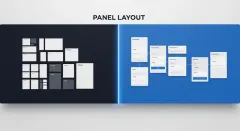
With Pixton, the teacher usually pre-builds the page: empty panels, speech bubble placeholders, a fixed layout. Students fill in the story. The scaffold lowers cognitive load, which is appropriate for younger learners or a first encounter with sequential narrative. The trade is that the scaffold caps what students can express, and the visual vocabulary is shared across the class.
With Comistitch, the teacher assigns a writing prompt and students author a complete scene description before touching the tool. Vague writing produces a vague panel; specific writing — light direction, posture, background — is rewarded. That makes the comic output function as a quality signal for the prose, which is what you want in a middle or high school writing unit.
For unit design, the manga storyboarding guide covers the narrative-to-panel translation students need to internalize first. As a warm-up, the free teach-a-lesson story idea generator produces consequence-driven premises that suit classroom use, and the comic script generator turns a premise into a paneled scene students can critique before writing their own.
Collaboration: An Honest Gap
Pixton for Schools is built around classroom management, as described above.
Comistitch runs on individual accounts with no shared classroom dashboard in the current release. For group projects the workable pattern is: split the story into scenes, assign each student one scene, export the panels, and compile them in presentation software or a class site. It works, and it requires more teacher orchestration than Pixton’s integrated approach.
If class management infrastructure is a primary requirement for you, that is a decisive difference and Pixton wins it. Our comic panel assembly guide covers the compilation step if you decide the trade is worth making.
Pricing, Licensing and School Safety
Pixton for Schools is a subscription sold to schools and districts. Pricing is not listed publicly — schools request a quote. Student accounts are school-managed with no personal email required, and Pixton publishes COPPA and FERPA documentation. For a district with strict data governance, that is a clearer baseline than we currently offer.
Comistitch, as of 21 September 2026 (figures from our pricing page):
- Free tier with credits at signup, no credit card — enough for a student to complete a short 4–6 panel assignment
- Starter $12.99/month, or $6.50/month billed yearly — 750 credits a month
- Pro $32.99/month, Elite $64.99/month for higher volume
- Commercial rights are included on Elite, and on Starter and Pro when billed yearly — relevant if student work will appear in a literary magazine or school publication
- No published COPPA or FERPA statement; contact us about a data processing agreement before deploying to under-13 students
Both figures move. Check both sites before a purchase order.
A Classroom Workflow That Fits One Period

Tested at 60–90 minutes, or split across sessions:
- Pre-write the scene descriptions (15 min). Three to five sentences per panel: who, doing what, where, in what light or mood. Give students a description rubric — this is the lesson, not the setup.
- Enter the character brief (5 min). Physical appearance, clothing, distinguishing features. Push for specificity: “shoulder-length dark hair, round glasses, green jacket” carries far better than “a teenager.”
- Generate panels (20–30 min). Students paste each description, review the panel, and revise the description where the output missed the intent. This revision step is itself a writing lesson — vague language visibly produces vague images.
- Arrange and export (10 min). Order the panels, add dialogue, export as image files or a share link for review.
- Peer review (10–15 min). Pairs swap and assess against a narrative rubric: does the transition make sense, is the character recognizable across panels, does the visual match the written description?
For the character-brief skill specifically, the manga character design guide works well as a pre-lesson handout, and how to create comics with AI covers the full pipeline for teachers previewing it themselves.
The Hybrid Some Teachers Prefer
Storyboard in Pixton, render in Comistitch. Students block out poses and expressions with avatars — fast, constrained, low-stakes — and that storyboard becomes the scene-description template they write from. You keep Pixton’s scaffolding where it helps and the generative feedback loop where it teaches.
The Bottom Line
If your rubric grades the process of visual storytelling, use Pixton. If it grades the quality of the story and you want the artwork to reflect that quality, use Comistitch. If your district requires published compliance documentation, use Pixton today and ask us again when we publish ours.
Ready to test the generative approach? The free tier gives every student enough credits for a short assignment with no purchase order. Start with the manga character design guide so students write strong character briefs before their first session, and the free AI manga guide as a student-facing handout.